Agency Data Publishing

Version and publish public geoscience data from a trusted backbone

State geological agencies manage valuable public datasets across geology, geochemistry, mineral occurrences, geophysics, mining records, and critical minerals programs. But every release gets harder when schemas, metadata, units, coordinate systems, and publishing workflows drift over time.

LithoX starts with a maintained Exploration Data Workspace foundation, then helps agencies review changes, manage versions, approve releases, and publish public data products for maps, downloads, APIs, ArcGIS Hub, portals, and public access experiences.

One trusted backbone for data stewardship, publishing, and public access.

Agency data foundation

Public datasets need a maintained backbone before release

Datasets live across ArcGIS layers, geodatabases, spreadsheets, and legacy systems. LithoX starts with the Exploration Data Workspace foundation, then manages review, versioning, and publishing.

Mineral occurrence tables
Geologic map layers
Geochemistry datasets
Geophysics catalogs
Mining records
Critical minerals inventories
File geodatabases
CSV / Excel
! Inconsistent schemas
! Missing or unclear units
! Mixed coordinate systems
! Duplicate records
! Stale metadata
! Inconsistent commodity names
! Manual release checks
! Separate publishing workflows
LithoX Workspace + Version + Publish

After LithoX

Versioned datasets ready for maps, downloads, APIs, and public access

LithoX turns approved workspace data into source-tracked releases with reviewed changes, validation results, metadata status, and publishing destinations attached to every version.

Every dataset includes source, vintage, CRS, transformation history, schema mapping, metadata status, and review state.

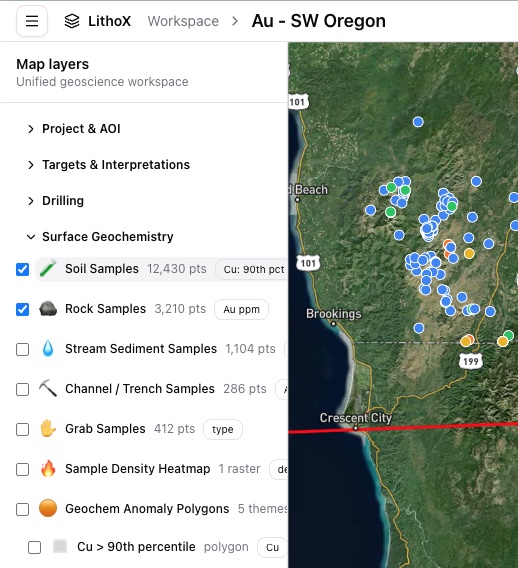
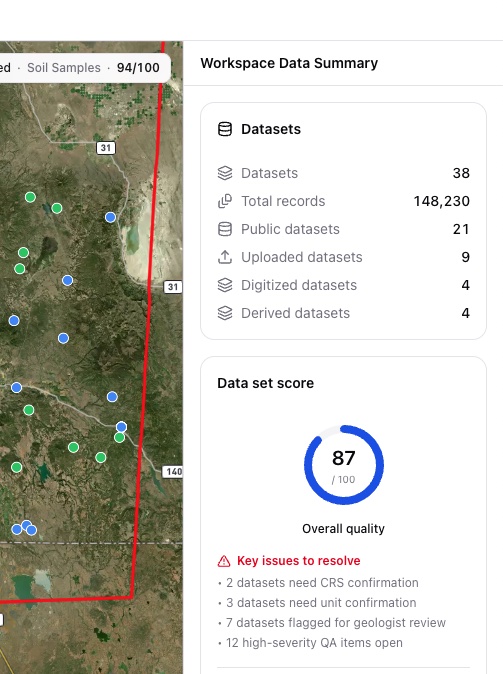
LithoX workspace map layers showing cleaned data LithoX workspace data quality checks for cleaned data

Before LithoX

Public data is digital, but every release still takes manual review

Agencies already have the data. The bottleneck is keeping a trusted data foundation current while preparing public-facing products every time something changes.

Datasets live across ArcGIS layers, geodatabases, shapefiles, spreadsheets, metadata exports, legacy databases, and public websites — and each release still needs review, metadata work, version control, approval, and publishing across multiple systems.

After LithoX

Versioned datasets ready for maps, downloads, APIs, and public access

LithoX starts with a maintained Exploration Data Workspace foundation for agency datasets, then turns approved changes into source-tracked public data products. Each release includes reviewed mappings, validation results, metadata status, transformation history, and publishing destinations.

Agency teams can compare versions, approve changes, resolve release blockers, and publish trusted data to multiple public channels from one workflow.

The same reviewed dataset can power internal GIS workflows, public maps, download packages, dataset pages, and simple search experiences for non-GIS users.

Exploration Data Workspace → Version + Review + Publish

The consistency bottleneck

Why public datasets get harder to maintain over time

Agencies maintain public datasets across mineral occurrences, geology, geochemistry, geophysics, mining records, critical minerals, GIS layers, and metadata exports.

But each program often evolves its own schemas, terminology, coordinates, units, source fields, and update workflows. Over time, that makes every release harder to maintain, harder to trust, and harder for the public to reuse.

LithoX creates a repeatable path from an Exploration Data Workspace foundation to reviewed, versioned, and publish-ready public data products.

Agency-approved standards. Versioned review. Consistent public releases.

Data ready for public release

A publishing layer on top of the Exploration Data Workspace

LithoX gives agencies one maintained Exploration Data Workspace backbone for turning existing digital datasets into public data products.

Maintain the data foundation once, then publish many ways: maps, downloads, APIs, ArcGIS-ready packages, website embeds, public search views, and portal-ready datasets.

Source history, schema mappings, CRS assumptions, metadata status, review state, and release versions stay attached to the data.

Publish to:

ArcGIS Hub
ArcGIS Online
Agency websites
Static downloads
APIs
Public map interfaces
LithoX-hosted public data pages
Searchable map and table views

Keep your stack

Keep ArcGIS. Add a geoscience data backbone.

LithoX is not a GIS replacement. Agencies can keep ArcGIS, ArcGIS Hub, internal geodatabases, desktop GIS workflows, public websites, and open-data infrastructure.

LithoX sits alongside that stack as the maintained data foundation and publishing workflow for versioned releases, approvals, and public outputs to the channels your agency already supports.

Core capabilities

From agency upload to public release

LithoX gives geology, GIS, and data teams a repeatable workflow for maintaining public geoscience datasets.

1

Upload or connect agency datasets

Start with the Exploration Data Workspace foundation

Begin with the datasets your agency already maintains inside a maintained geoscience data workspace: mineral occurrences, geology, geochemistry, geophysics, mining records, critical minerals inventories, ArcGIS layers, geodatabases, shapefiles, spreadsheets, GeoPackages, and metadata exports.

The workspace foundation keeps source references, metadata status, update dates, and current publishing destinations attached before release work begins.

Mineral occurrences Geology layers Geochemistry Geophysics Mining records Critical minerals ArcGIS layers Geodatabases Shapefiles CSV / Excel Metadata
2

Create a new draft version automatically

Review changes before anything goes public

When new data is uploaded or connected, LithoX creates a draft version instead of overwriting the current public release.

Agency teams can review what changed, compare the draft to the published version, resolve flagged issues, and approve updates before anything goes public.

Draft versions Published releases Change detection Version comparison Reviewer approvals Rollback history
3

Apply agency-approved standards

Keep standards under reviewer control

Use agency-approved schema, terminology, metadata, and release rules from the workspace foundation when preparing a public version.

Agency staff approve, edit, or override release decisions before publication, and every decision is saved to the audit trail.

Schema mapping Commodity names Deposit types Mineral systems Geologic units Sample types Units CRS Source references Metadata fields
4

Review every suggested change

Defensible decisions for public release

Review terminology changes, metadata updates, source-field mappings, duplicate handling, and release notes before anything is published.

Every approval, edit, and override is logged so your team can defend what changed and why.

Mappings Terminology Unit conversions CRS assumptions Duplicate matches Metadata Source fields Review status Audit trail
5

Resolve release blockers

Catch issues before publishing

LithoX flags missing coordinates, invalid geometries, duplicate records, missing units, stale metadata, broken source links, unclear source references, schema drift, and incomplete download packages.

Every warning links back to the source record so staff can resolve issues before publishing.

Missing coordinates Invalid geometries Duplicate records Missing units Stale metadata Broken links Unclear sources Schema drift Incomplete packages
6

Publish once to multiple destinations

Package the approved version for every channel

After review, LithoX packages the approved version for the channels your agency already supports.

Publish approved, source-tracked data to ArcGIS Hub, ArcGIS Online, agency websites, APIs, static downloads, GeoJSON, GeoPackage, Shapefile, CSV, PostGIS, and public map experiences.

ArcGIS Hub ArcGIS Online Agency websites APIs GeoJSON GeoPackage Shapefile CSV PostGIS Static downloads Public maps
7

Host public access layers on LithoX

Give non-GIS users a simple way to explore data

Agencies can also publish public-facing map views, searchable dataset pages, filtered tables, basic charts, downloads, and plain-English search through LithoX.

This gives non-GIS users a simple way to explore authoritative public geoscience data without forcing every user into ArcGIS.

Public maps Dataset pages Search Filtered tables Downloads Embeds Basic charts Plain-English search

Outputs

Concrete outputs your agency can review and publish

Maintained public geoscience workspace
Draft and published dataset versions
Agency-approved schema mappings
Release blocker queue
Reviewed terminology, metadata, and source-field changes
Source metadata and transformation history
Dataset version history and change logs
Reviewer approvals and audit trail
Publish-ready packages for ArcGIS Hub, ArcGIS Online, agency websites, APIs, downloads, and portals
LithoX-hosted public map views, dataset pages, search, charts, and downloads

Ready to publish public geoscience data from a trusted workspace foundation?

Start from a maintained Exploration Data Workspace, preserve source history, manage versioned releases, and publish maps, downloads, APIs, and public access experiences from one trusted backbone.