Exploration Data Workspace

Turn any exploration project into an analysis-ready workspace

Start with an AOI, claim block, district, or project area. LithoX loads cleaned public marketplace data for that area and connects private files wherever they live — then standardizes, QA/QC, and exports trusted geoscience datasets.

We standardize schemas, fix coordinate systems, normalize units, flag QA/QC issues, and export trusted datasets into Leapfrog, ArcGIS, QGIS, Oasis montaj, ioGAS, and more.

From trusted public data and proprietary files to analysis-ready layers in hours.

Input sources

Scattered public + private data

Public datasets and proprietary files arrive with inconsistent names, schemas, units, and spatial references.

Public portals
Geological survey layers
Mineral occurrences
Historical reports
Drillhole tables
Contractor folders
GIS layers
Assay files
! Unknown CRS
! Cu_ppm / copper / Cu%
! Duplicate sample IDs
! Missing hole IDs
! Unclear units
! Disconnected tables
LithoX Standardize + QA

Clean workspace

Analysis-ready, source-tracked, and exportable

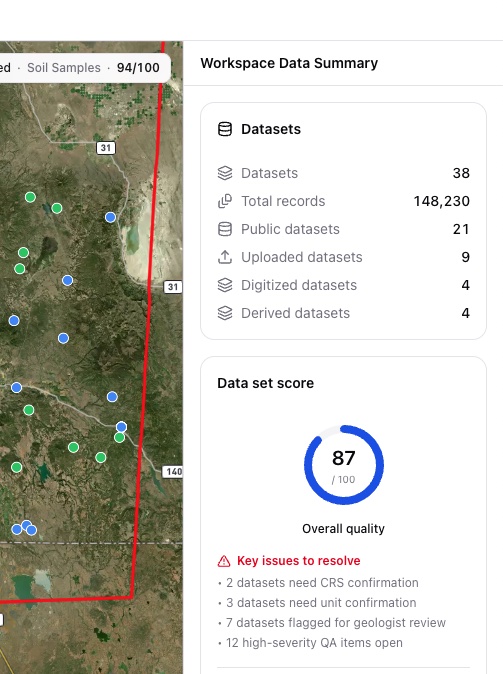
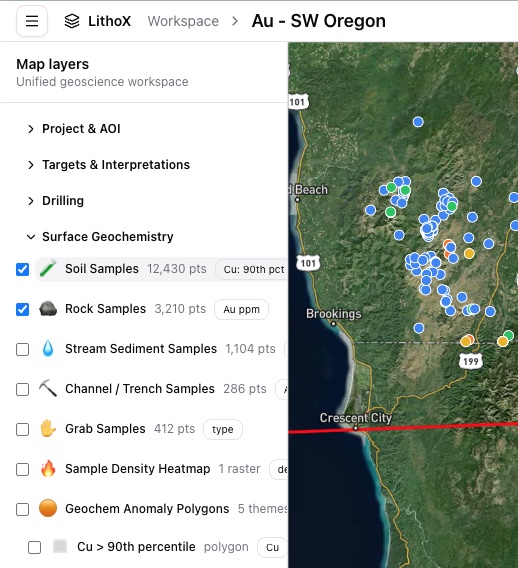
Standardized records become reviewable map layers, QA/QC queues, provenance logs, and export packages for the tools your team already uses.

Every layer includes source, vintage, CRS, transformation history, and review status.

LithoX workspace map layers showing cleaned data LithoX workspace data quality checks for cleaned data

The cleanup bottleneck

Before interpretation starts, someone has to clean the data.

Exploration teams cannot model, map, or rank targets until the source data is joined, validated, normalized, and traceable. The work is necessary, but repetitive.

What used to take days of GIS cleanup, spreadsheet joins, and manual QA becomes a repeatable workflow your team can review in a single workspace.

Fixing coordinate systems
Joining collar, survey, assay, and lithology tables
Normalizing element names and units
Cleaning shapefiles and GIS layers
Validating intervals
Checking duplicate samples
Reconciling contractor formats
Preserving source metadata

Data ready for interpretation

The Exploration Data Workspace for exploration teams

LithoX helps teams ingest, validate, normalize, and export exploration data before it enters interpretation tools.

The platform turns raw project files, contractor deliverables, GIS layers, public datasets, and drillhole tables into clean, reviewable workspaces with source metadata preserved.

LithoX uses AI to accelerate schema mapping, CRS detection, unit normalization, and metadata extraction - but no assumption is hidden. Geologists can approve, edit, or override every decision before the workspace is finalized.

Built for the modeling stack

Clean, trusted geoscience data before it reaches your modeling stack.

LithoX is not another interpretation silo. It prepares trusted data for the GIS, modeling, geochemistry, and geophysics tools your team already uses.

Core capabilities

From AOI to export-ready datasets

LithoX gives geologists and data teams a repeatable path from area selection to trusted, source-tracked exploration data.

1

Select AOI

Start with the area you care about

Draw a property, claim block, or district. LithoX automatically pulls relevant public geology, geochemistry, geophysics, mineral occurrences, claims, access, and terrain data from trusted sources.

LithoX connects to authoritative geological surveys, mineral occurrence databases, geochemistry repositories, geophysics catalogs, land-status datasets, and terrain sources - then clips, standardizes, and tracks provenance for the datasets relevant to your AOI.

2

Connect private data

Add your internal project data

Add drillholes, assays, geochemistry, GIS layers, contractor files, reports, or data-room packages from wherever they live.

Drillholes Assays GIS layers Contractor files Reports Data rooms
3

Normalize with AI assistance

Standardize the messy parts

LithoX detects schemas, CRS, units, element names, drillhole tables, sample types, and metadata, then converts records into consistent geoscience structures.

Collars Surveys Assays Lithology Surface samples Geochemistry Structures Mineral occurrences Target polygons
4

Review every decision

Keep geologists in control

Geologists can approve, edit, or override AI-suggested mappings, unit conversions, CRS assumptions, sample classifications, metadata extraction, and duplicate matches.

Every decision is saved to the audit trail.

Mappings Unit conversions CRS assumptions Sample classifications Metadata Duplicate matches
5

Validate before interpretation

Catch issues before interpretation

Flag missing IDs, interval errors, bad coordinates, unit ambiguity, duplicate records, suspicious nulls, unsupported land claims, and public/private data conflicts.

Every warning links back to the original source.

Missing IDs Interval errors Bad coordinates Unit ambiguity Duplicate records Suspicious nulls Unsupported land claims Data conflicts
6

Optional targeting workflow

Use clean data for targeting, or export immediately

Once your workspace is normalized and validated, you can export it directly or send it into LithoX Targeting Workflows to build transparent, geologist-controlled target rankings.

This keeps the Exploration Data Workspace focused while making targeting available when your team is ready.

Presets Visual controls Plain English criteria Weights Thresholds Buffers Evidence layers
7

Send downstream

Package clean, source-tracked data

Package clean, source-tracked data for Leapfrog, ArcGIS, QGIS, Oasis montaj, ioGAS, GeoPackage, GeoJSON, Shapefile, and CSV.

Leapfrog ArcGIS QGIS Oasis montaj ioGAS GeoPackage GeoJSON Shapefile CSV
What you get

Concrete outputs your team can review and export

Clean public-data workspace for your AOI
Standardized private datasets joined to public layers
QA/QC issue queue
Reviewed schema mappings and unit conversions
Source metadata and transformation history
Export packages for Leapfrog, ArcGIS, QGIS, Oasis montaj, ioGAS, GeoPackage, GeoJSON, Shapefile, and CSV

Ready to make your exploration data analysis-ready?

Select an AOI, connect your private files, and let LithoX turn public and proprietary geoscience data into a clean, validated workspace your team can review, model, and export.