Due Diligence Workspaces

Turn project data rooms into technical review workspaces

Upload a vendor package, project ZIP, data room, or historical exploration archive. LithoX starts by creating an Exploration Data Workspace foundation, then adds the diligence views your team needs to review sources, gaps, claims, risks, and exports.

Get from project intake to technical review in hours, not weeks.

Project package

Vendor files, reports, and historical data

Vendor folders, historical reports, drillhole tables, assay files, GIS layers, contractor deliverables, and public datasets arrive with inconsistent schemas, units, coordinates, and source references.

Data rooms
ZIP folders
Reports
Drillhole tables
Assay files
GIS layers
Contractor folders
Historical files
! Unknown CRS
! Unclear units
! Disconnected tables
! Duplicate sample IDs
! Missing hole IDs
! Inconsistent element names
LithoX Workspace foundation

Review workspace

Diligence-ready, source-tracked, and exportable

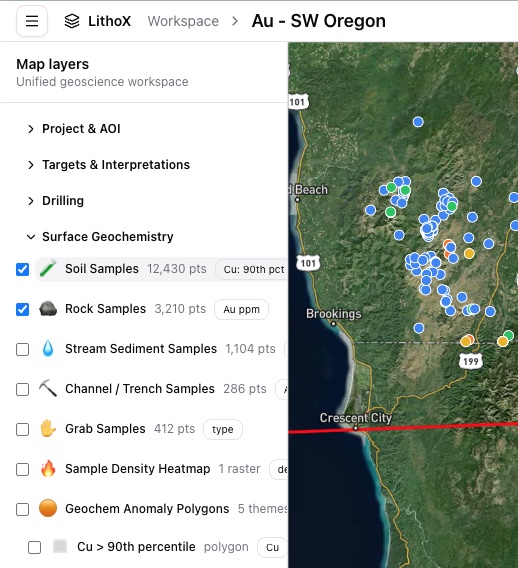
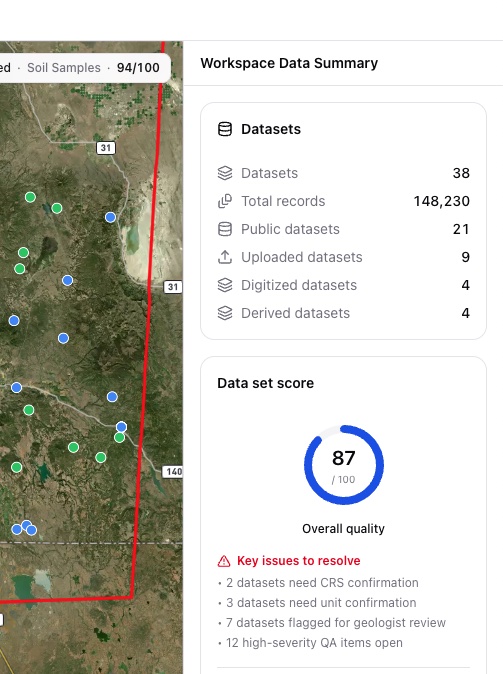
The Exploration Data Workspace foundation becomes reviewable map layers, source evidence, gap lists, provenance logs, and export packages for the tools your team already uses.

Every layer includes source, vintage, CRS, transformation history, and review status.

LithoX workspace map layers showing cleaned data LithoX workspace data quality checks for cleaned data

Technical review starts with reconstruction

Project evaluation should not start with manual data reconstruction

Before a geologist, consultant, investor, or corporate development team can evaluate a project, the data has to be reconstructed.

That usually means finding usable files, joining drillhole tables, checking assay data, resolving coordinate systems, normalizing units, and deciding which records are complete enough to trust.

LithoX starts by creating the same Exploration Data Workspace foundation used across the platform, then adds diligence-specific views for source evidence, gaps, unsupported claims, red flags, and export packages.

The outcome is faster time to analysis with better data quality and traceability.

Manual reconstruction usually means:

Finding usable data inside folders, reports, maps, and spreadsheets
Joining drillhole, assay, survey, and lithology tables
Resolving coordinate systems and normalizing units
Checking which records are complete enough to trust
Preserving provenance for technical review

Review-ready workspace

The same Exploration Data Workspace, applied to project evaluation

LithoX helps diligence teams start from a structured Exploration Data Workspace instead of rebuilding the data foundation for every project review.

The diligence layer focuses on the review work that follows: finding usable datasets, checking source support for vendor claims, surfacing gaps, preserving review context, and preparing export packages for the tools your team already uses.

It does not replace technical judgment. It gets your team to technical judgment faster.

Core capabilities

From data room to review-ready workspace

LithoX gives technical teams a repeatable workflow for moving from an Exploration Data Workspace foundation to source-tracked project review.

1

Start with the files you actually receive

Ingest the project package

Upload a vendor data room, project ZIP, consultant folder, historical archive, or mixed file package. LithoX organizes the contents, classifies files by data type, and creates a searchable inventory of what can feed the workspace, support review, or move to export.

Your team can quickly see what was received, what is readable, what was extracted, and which files need human review.

Data rooms ZIP folders Reports Drillhole tables Assay tables Lithology GIS layers GeoPackages CSV / Excel Contractor folders Historical files
2

Use the same Exploration Data Workspace foundation

Build the workspace foundation

LithoX applies the Exploration Data Workspace foundation to the received project package so diligence reviewers start from organized, source-tracked technical data.

The detailed data preparation controls live in the foundation workspace. Due diligence adds the acquisition-specific review layer on top.

Received files Usable datasets Source links Review status Workspace layers Export packages
3

Move from workspace setup to project evaluation

Review gaps, risks, and claims

Reviewers can inspect what data is present, what is missing, which vendor claims are supported by source records, and which technical risks need follow-up.

Every finding links back to the source files and workspace layers used during review.

Missing data Unsupported claims Red flags Source evidence Follow-up questions Review notes
4

Keep diligence context attached

Package the technical review workspace

Reviewers can inspect maps, source metadata, incomplete records, public/private datasets, claim evidence, and red flags in one place.

This gives diligence teams a clearer path from project intake to technical judgment.

Map layers Source metadata Incomplete records Public/private datasets Claim evidence Review-ready exports
5

Send the reviewed workspace into the tools your team already uses

Export downstream

Export source-tracked datasets, review summaries, inventories, and tool-ready packages for GIS, modeling, geochemistry, and geophysics workflows.

Leapfrog, ArcGIS, QGIS, Oasis montaj, ioGAS, GeoPackage, GeoJSON, Shapefile, CSV, and diligence summaries are supported as downstream deliverables.

Leapfrog ArcGIS QGIS Oasis montaj ioGAS GeoPackage GeoJSON Shapefile CSV Review summary

What you get

Concrete outputs your team can review and export

Project data inventory
Exploration Data Workspace foundation for the received project data
Data quality and completeness issue queue
Red-flag report
Missing-data inventory
Vendor-claim evidence table
Technical review checklist
Reviewed schema mappings and unit conversions
Source metadata and transformation history
Audit trail of AI-assisted decisions and human overrides
Export packages for Leapfrog, ArcGIS, QGIS, Oasis montaj, ioGAS, GeoPackage, GeoJSON, Shapefile, and CSV

Ready to evaluate project data faster?

Upload a project package, build the Exploration Data Workspace foundation, and move straight into source-backed diligence review.