
Targeting Workflows

Rank exploration targets faster - with evidence your team can defend

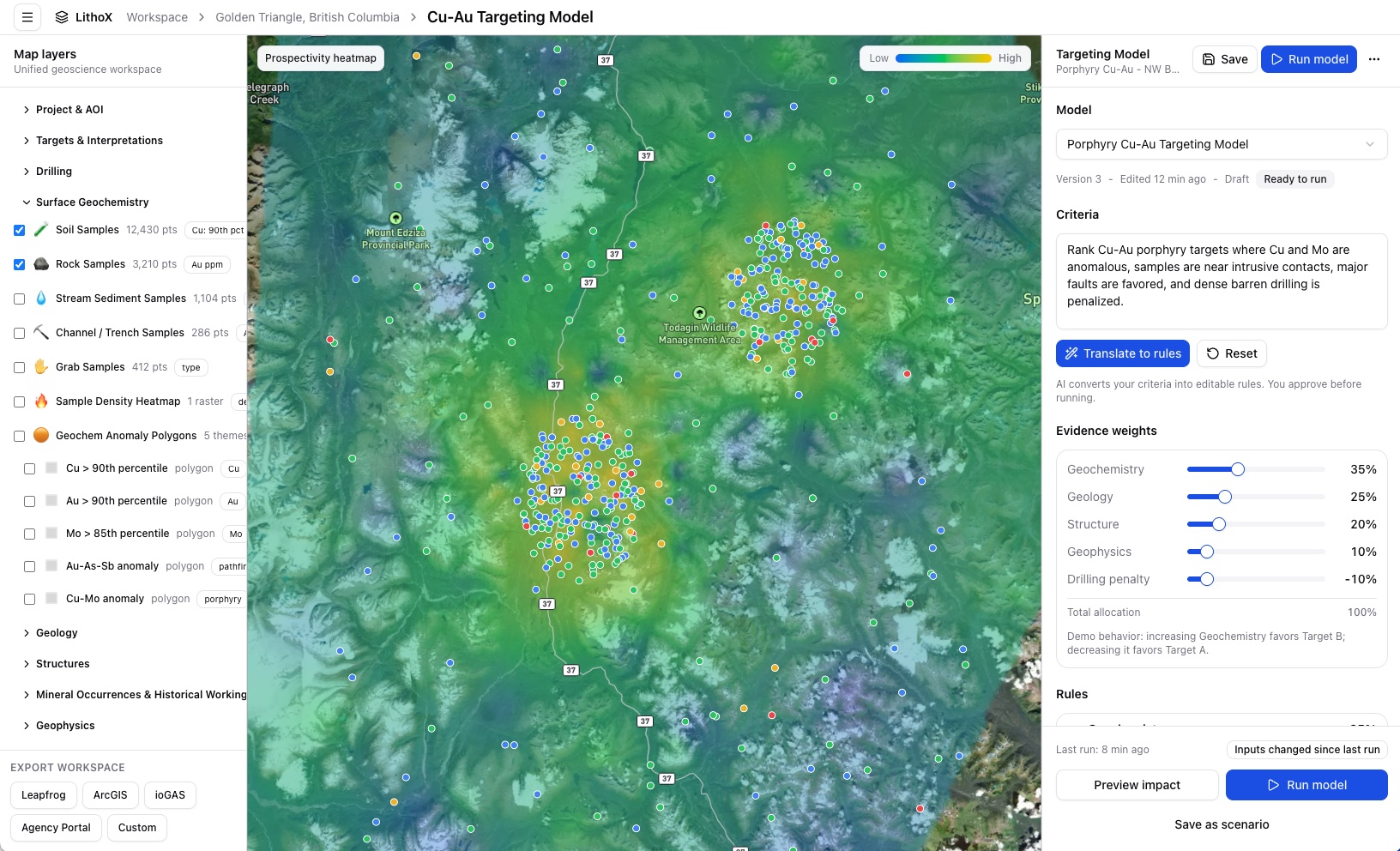
Turn your team's exploration logic into transparent, repeatable target rankings. Define models like: Cu > 90th percentile, Mo > 85th percentile, within 1 km of intrusive contact, within 500 m of major structure, magnetic edge support, and penalties for dense barren drilling.

LithoX ranks targets from your criteria and shows the full evidence trail behind every result.

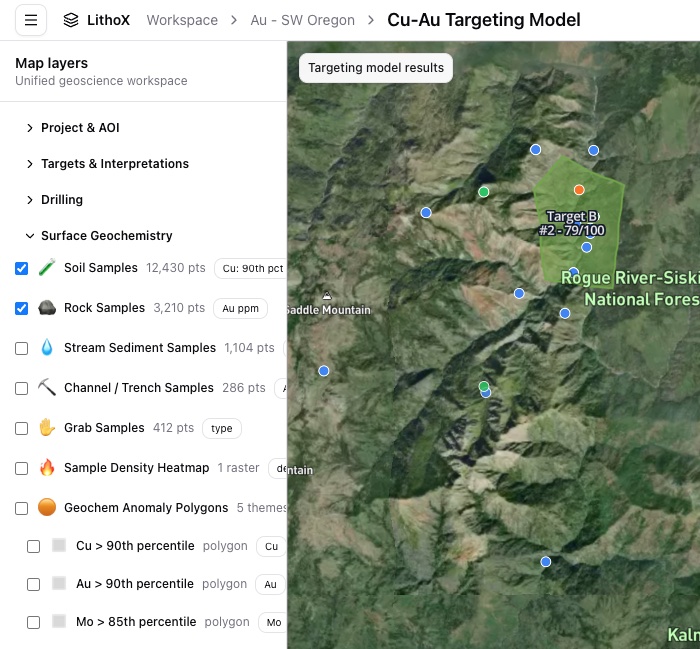
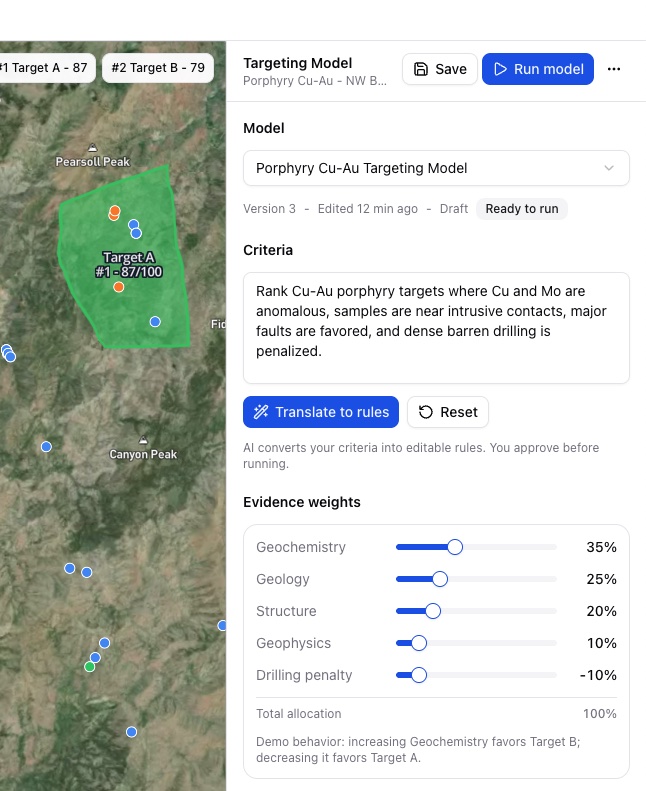
LithoX targeting model map and evidence layers on mobile LithoX targeting model controls and ranked target output on mobile

Built on the Exploration Data Workspace

Targeting sits on top of trusted workspace data

Configurable Targeting Workflows start from the same Exploration Data Workspace foundation as LithoX GIS.

The workspace provides the trusted AOI data, private project layers, provenance, and review state. Targeting Workflows then add prospectivity recipes, model versions, evidence traces, and ranked target outputs on top.

Workspace foundation below. Defensible target models on top.

Public Geology
Geochemistry
Geophysics
Mineral Occurrences
Structures
Claims and Access Layers
Private Drillholes
Assays
Lithology
GIS Files
Contractor Deliverables
Historical Reports and Data-Room Packages

Repeatable targeting logic

From expert judgment to repeatable targeting logic

Exploration teams already rank targets by combining geology, geochemistry, geophysics, structures, drilling, known occurrences, and field interpretation. But that logic is often spread across GIS projects, specialist tools, reports, spreadsheets, slide decks, and conversations. LithoX captures the logic as a configurable model another geologist can inspect, edit, rerun, and compare.

Before LithoX

Evidence spread across separate tools and files
Target ranking logic hard to reproduce
New data requires manual rework
Scenario comparisons are difficult
Assumptions are buried in maps or presentations
Hard to explain why Target A outranks Target B

With LithoX

Saved targeting recipes
Editable thresholds, buffers, weights, and penalties
Ranked target polygons with evidence traces
Version history for every model run
Scenario comparison
Export-ready outputs for existing tools

Product workflow

A repeatable workflow for target ranking

Start from an Exploration Data Workspace, choose or create a prospectivity recipe, approve the model logic, compare scenarios, then generate ranked target areas.

LithoX outputs are screening and prospectivity maps, not geological models, resource estimates, or drill recommendations.

1

Start from your Exploration Data Workspace

Begin with the trusted public and private datasets already organized in your Exploration Data Workspace. Targeting Workflows use that foundation as the evidence layer stack before any model logic runs.

Historical reports, old drill logs, legacy geochemistry, scanned maps, and government records can feed the workspace first, then become evidence layers for the targeting model.

Workspace evidence layers

Trusted public geology
Public geochemistry
Public geophysics
Mineral occurrences
Claims, access, and terrain
Private drillholes and assays
GIS layers and contractor files
Reports and data-room packages
2

Define the targeting model

Start from a preset such as Porphyry Cu-Au, use visual controls to define thresholds, buffers, weights, and penalties, or explain the model in plain English and AI configures the first draft. You can review, edit, or override the model at any time before it runs.

"Rank Cu-Au porphyry targets where Cu and Mo are anomalous, samples are near intrusive contacts, faults are favored, and dense barren drilling is penalized."

LithoX converts this to structured rules for review, and your team can override the configuration at any time.

UI controls or plain English

Cu above 90th percentile = positive evidence
Mo above 85th percentile = positive evidence
Within 1 km of mapped intrusion
Within 500 m of major structure
Magnetic high or magnetic edge support
Dense historic drilling penalty
3

Tune the model visually

Adjust assumptions and see how rankings change. Ask what happens if Mo matters more, structure matters more than geochemistry, known occurrence bias is removed, underexplored areas are prioritized, or dense barren drilling is penalized.

Visual controls

Cu threshold
Mo threshold
Fault buffer
Intrusion buffer
Geophysics weight
Known occurrence weight
Underexplored-ground weight
Barren-drilling penalty
4

Inspect every ranked target

Each ranked target includes total score, positive evidence, negative evidence, source datasets, thresholds applied, weights used, buffers used, penalties applied, model version, author and date, and export package.

Target A - 87/100

Cu above 90th percentile
Mo above 85th percentile
Within 1 km of intrusive contact
Within 500 m of major structure
Magnetic edge support
Moderate historic drilling density
Porphyry Cu-Au recipe, version 3
5

Compare targeting scenarios

Run multiple versions of the same model and compare how the rankings change. The strongest targets are often the ones that remain compelling across multiple defensible assumptions.

Scenario comparison

Geochemistry-heavy model
Structure-weighted model
Underexplored-ground model
Conservative model with drilling penalty
Known-occurrence-weighted model
Permissive early-stage screening model
6

Export into your exploration stack

Export ranked target polygons, evidence layers, scoring tables, model configuration, source dataset inventory, workspace review notes, and report packages. LithoX prepares transparent target outputs your team can use downstream.

Keep using trusted tools

ArcGIS
QGIS
GeoPackage
GeoJSON
CSV
Leapfrog target polygons
ioGAS-ready geochemistry
Report package

Build a targeting model your team can defend

Define your criteria, approve the model logic, compare scenarios, inspect every evidence trace, and export the results into your existing exploration workflow.