LithoX GIS

AI-powered, cloud-native GIS for exploration teams

Build maps, filters, geochemistry plots, and reproducible geoscience workflows from your Exploration Data Workspace — without wrestling with desktop GIS projects, broken layers, local files, or manual visualization setup.

Ask LithoX for the map, chart, filter, or workflow you need. LithoX turns your request into editable GIS layers, geochemistry plots, saved views, and repeatable workflows your team can inspect, modify, rerun, and export.

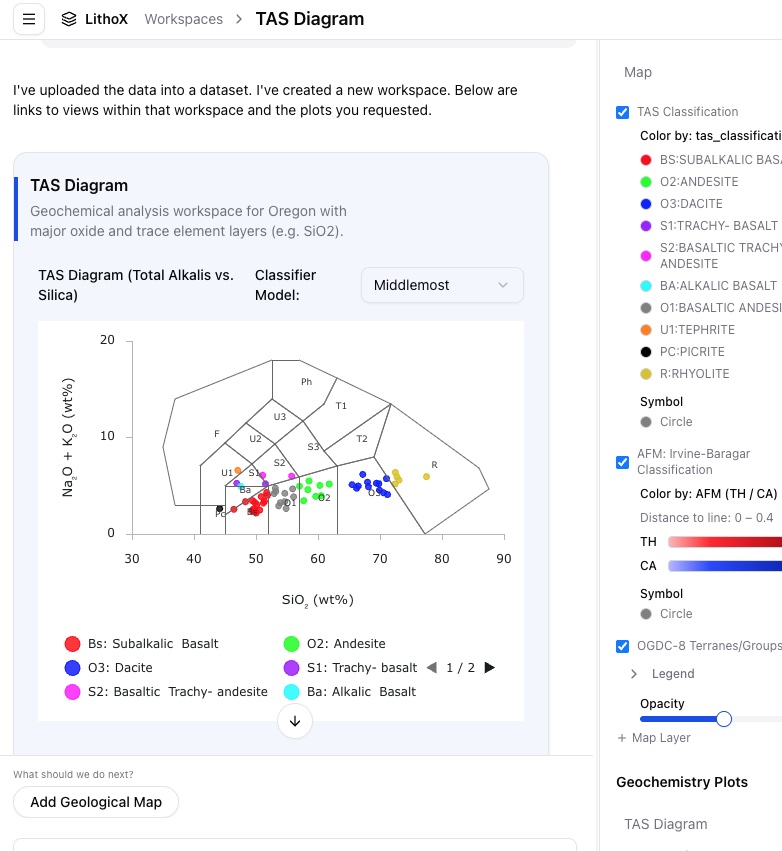
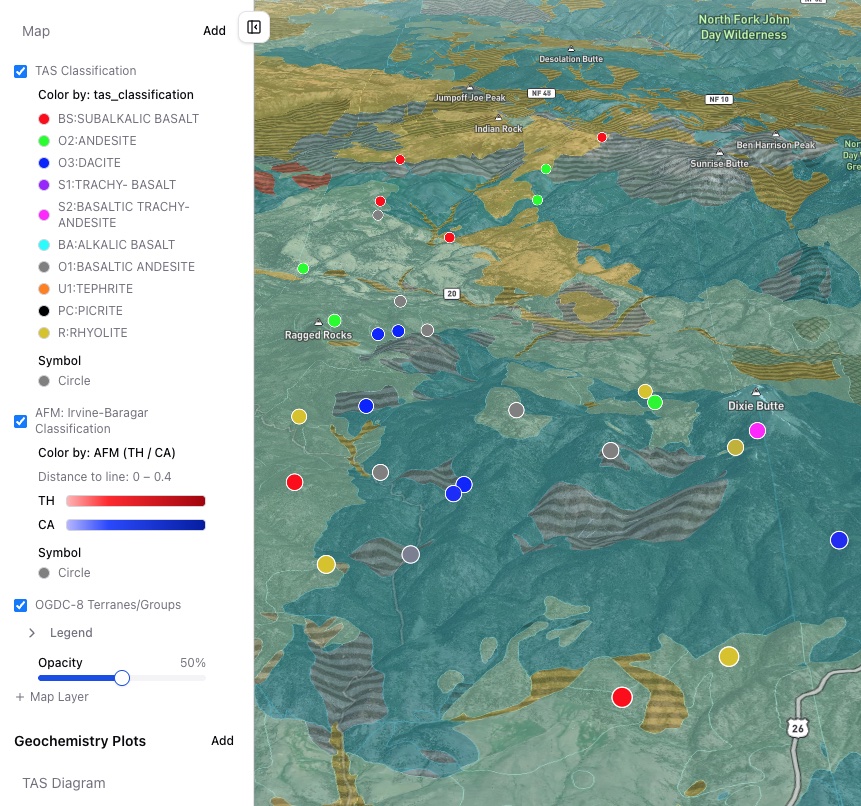
LithoX GIS geochemistry plot on mobile LithoX GIS map layers on mobile

Traditional desktop GIS is powerful, but it was not built around geologists working with constantly changing AOIs, drillhole tables, geochemistry, assays, public datasets, contractor folders, and AI-assisted workflows.

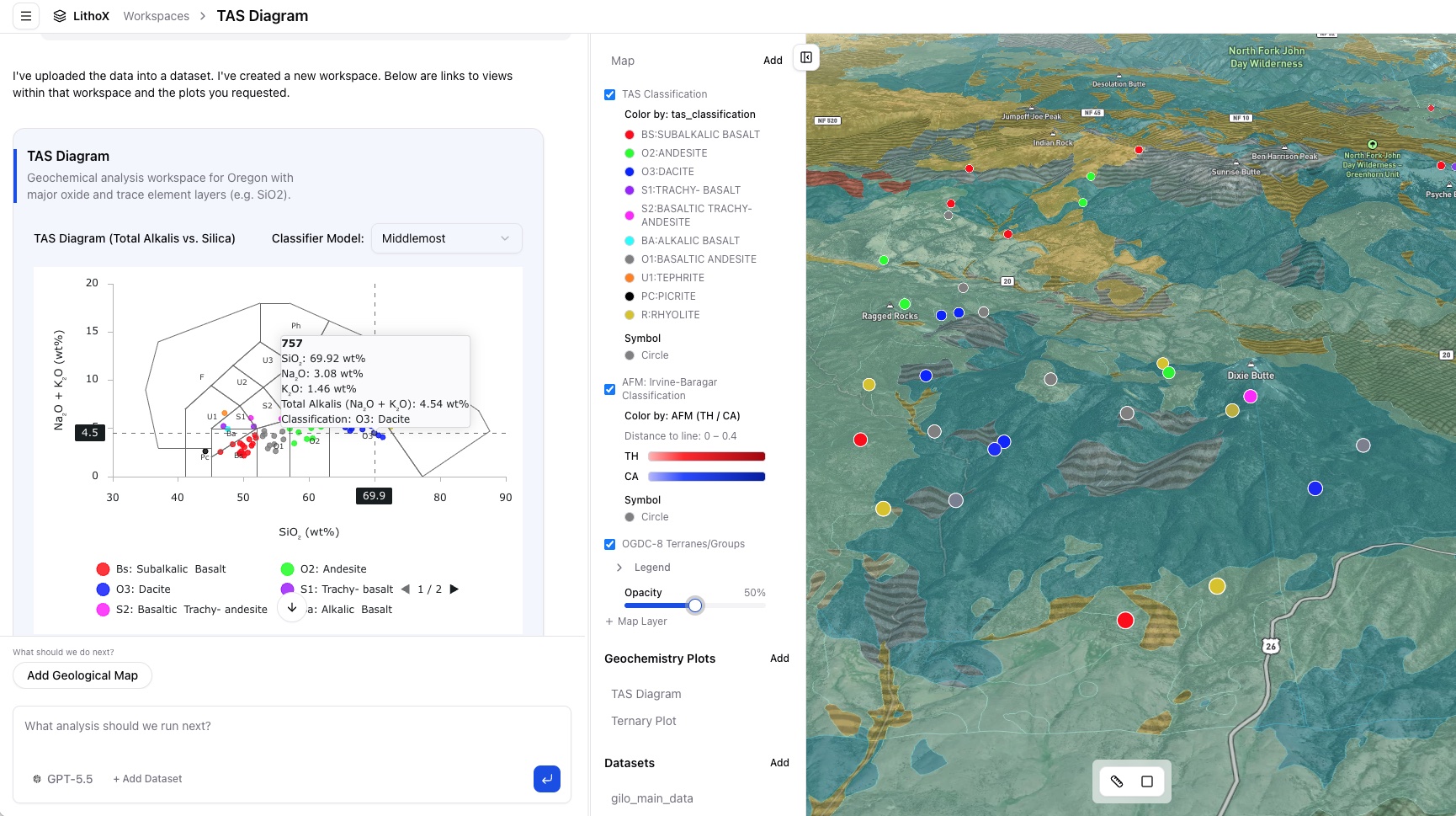
LithoX GIS gives exploration teams a browser-based geoscience workspace where maps, plots, filters, data tables, saved workflows, and exports all live together.

  • No local project files
  • No broken file paths
  • No stale map exports
  • No rebuilding the same views every time data changes

Trusted data first

LithoX GIS starts with your Exploration Data Workspace

Every LithoX GIS project begins with an Exploration Data Workspace: a clean, source-tracked exploration workspace built from public datasets and private project files.

Select a claim block, district, or project area. LithoX pulls relevant public geology, geochemistry, geophysics, mineral occurrences, claims, access, and terrain data, then combines it with your private drillholes, assays, GIS layers, reports, and contractor deliverables. The Exploration Data Workspace standardizes schemas, fixes CRS and unit issues, flags QA/QC problems, and preserves provenance before analysis begins.

Once the Exploration Data Workspace is clean, LithoX GIS becomes the cloud-native analysis layer on top.

Clean exploration data below. AI-powered GIS on top.
Built on

Exploration Data Workspace

Public + private data, standardized and source-tracked before GIS analysis begins.

The GIS bottleneck

Geologists know what they want to see. GIS makes them configure it manually.

Exploration teams spend too much time setting up maps instead of interpreting geology.

A simple question can require finding the right layer, joining the right table, fixing styles, configuring filters, generating plots, and rebuilding everything when new data arrives.

Desktop GIS is powerful, but it is often file-based, fragile, and disconnected from the fast-moving exploration workflow.

From

Before LithoX GIS

GIS projects trapped on local machines.
Broken file paths and stale layer references.
Manual styling and filtering.
Geochemistry plots built in separate tools.
Difficult workflow reproduction.
Hard to rerun analysis when data changes.
Maps disconnected from QA/QC and provenance.

To

With LithoX GIS

Cloud-native project workspace.
AI-generated maps, plots, and filters.
Full manual GIS controls when needed.
Geochemistry plots connected to map layers.
Saved workflows and reusable skills.
Source-tracked layers from the Exploration Data Workspace.
Exportable outputs for the broader exploration stack.

AI-powered GIS

Ask for the map. Inspect the logic. Edit everything.

LithoX GIS lets geologists build plots and maps in seconds so they can spend more time on analysis and less time uploading data, mapping fields, and configuring visualizations.

Ask LithoX to:

Map anomalous geochemistryFilter samples by percentileStyle points by element valuesCompare assays by lithologyGenerate geochemistry cross-plotsBuild saved map viewsCreate reusable GIS workflowsUpdate maps when new data arrivesExport layers, tables, plots, and figures

The AI accelerates setup. The geologist stays in control.

A cloud-native GIS platform where chat, maps, plots, data tables, and workflows all operate on the same Exploration Data Workspace.

From AOI to reproducible map workflow

1

Start from an Exploration Data Workspace

Draw or upload an area of interest. LithoX creates a clean exploration workspace with public and private data clipped, standardized, validated, and source-tracked.

"Create a workspace for this AOI with public geology, regional geochemistry, MINFILE occurrences, claims, roads, DEM, and intrusive contacts."

Output

AOI boundarypublic data inventorysource-tracked layersnormalized geochemistrycleaned private datasetsQA/QC warningsprovenance log
2

Ask LithoX GIS for the map you need

Use chat to define the map, filters, styling, labels, and view. Everything can be inspected and edited.

"Show Cu samples above the 90th percentile, color points by Mo, size points by Au, and overlay faults and intrusive contacts."

Output

filtered Cu anomaly layerCu percentile thresholdMo color scaleAu symbol sizingfaults overlayintrusive contact overlaylegendsaved map view
3

Build geochemistry plots from the same data

Create plots directly from your Exploration Data Workspace instead of moving data between GIS, spreadsheets, and specialist plotting tools.

"Create a Cu vs Mo scatter plot colored by lithology and filtered to rock samples."

Output

scatter plotshistogramselement comparisonscorrelation viewsfiltered sample tablesplot-linked map selectionssaved plot configurations
4

Use full GIS controls when you want precision

LithoX GIS is not only chat. Users can manually control layers, symbology, filters, joins, buffers, views, and exports. The AI is a workflow accelerator, not a black box.

Output

layer visibilitysymbologycolor rampspoint sizelabelsfiltersbuffersjoinssaved viewsmap exportsplot settings
5

Save repeatable workflows as skills

Turn recurring analysis into reusable LithoX skills that can run again when new data is added.

Output

custom skillssaved promptsrerunnable workflows
6

Export outputs into the tools your team already uses

Export maps, layers, tables, plots, and workflow outputs into the broader exploration stack.

Output

CSVGeoPackageGeoJSONShapefilemap imagesplot imagesLeapfrog-ready layersioGAS-ready tablesArcGIS/QGIS-ready layers

A complete cloud-native GIS workflow for geoscience teams

AI-assisted map configuration

Describe the map you want in plain English, and LithoX configures the GIS workspace from your grounded AOI data. It selects the relevant layers, applies filters, sets symbology, labels features, and creates saved views — the same things you could do manually, just faster.

Full manual GIS controls

Use standard GIS controls whenever you need precision. Adjust layers, styling, labels, filters, joins, buffers, tables, legends, and saved views directly.

Grounded geochemistry plots

Create scatter plots, histograms, element comparisons, correlation views, and custom charts from standardized AOI geochemistry and assay data. LithoX plots your data; it does not invent interpretations.

Map-linked plots

Select samples in a plot and see them on the map. Filter the map and update the plot in the same workspace.

Reusable GIS workflows

Save repeated map, filter, and geochemistry workflows as LithoX skills that can run again when new data is added.

Cloud-native collaboration

Keep maps, data, plots, filters, provenance, and outputs in a shared browser-based workspace instead of local desktop project files.

Source-tracked layers

Every map layer is tied back to the Exploration Data Workspace, with source, vintage, CRS, transformations, QA/QC status, and review history.

Exportable outputs

Export data, map layers, plots, figures, and saved workflow outputs into the tools your team already uses.

Replace repetitive GIS setup, not geological judgment

Replaces repetitive work like

Setting up project maps.
Restyling layers.
Configuring filters.
Joining tables.
Building geochemistry plots in separate tools.
Rebuilding maps after new assays arrive.
Copying data between GIS, spreadsheets, and plotting tools.
Creating one-off screenshots that cannot be reproduced.
Maintaining fragile local GIS projects.

Does not replace

Geological interpretation.
Field judgment.
Resource modeling.
Leapfrog implicit modeling.
Geophysics inversion.
Final drill targeting decisions.

Built for how exploration teams actually work

Exploration projects change constantly. New assays arrive. Public datasets update. Contractors send revised files. Geologists need to compare AOIs, rerun filters, share maps, and export outputs without rebuilding local GIS projects.

LithoX GIS is cloud-native by default, so your workspace can stay connected to:

AOI public dataprivate uploadsQA/QC statussaved map viewsgeochemistry plotsworkflow versionsexport packagesteam review history

The map is no longer a static project file. It becomes a living, versioned exploration workspace with a full audit log.

Outputs your team can review, share, and export

AOI map views.
Styled GIS layers.
Filtered sample layers.
Geochemistry plots.
Plot-linked map selections.
Saved workflow skills.
Map-driven filters.
Derived columns and classifications.
Export-ready GIS packages.
Report-ready figures.
Source-tracked analysis history.
Downstream export packages.

Ready to work with your AOI data through LithoX GIS?

Start with an Exploration Data Workspace, then ask LithoX GIS to generate the maps, filters, plots, and workflows your team needs.